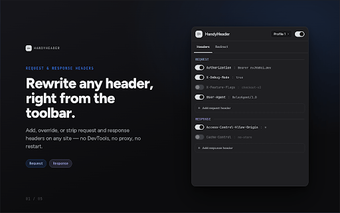
HandyHeader: Lightweight Chrome extension for local HTTP header editing
HandyHeader, developed by woozo, is a Chrome extension for developers and power users who need direct control over HTTP traffic. It lets users modify request and response headers and set URL redirects inside the browser with a simple interface. Key elements include a minimal UI, local execution without external data transmission, and a tiny installation footprint. The extension is aimed at web developers, security researchers, and IT professionals who want a privacy-conscious header tool for debugging and testing.
What is HandyHeader used for?
HandyHeader is an extension that focuses on in-browser manipulation of HTTP activity, providing header edits and redirect rules as its primary actions. The tool is presented as a compact alternative to larger header editors and is positioned for hands-on testing and debugging tasks. Its core capabilities include changing request headers, altering response headers, and applying URL redirections, all surfaced through a deliberately simple interface.
How light is its footprint and impact on the browser?
The extension keeps resource demands low, with an approximate size of 241KiB reported for the installer. That small footprint suggests minimal storage impact compared with bulkier developer extensions. Compatibility extends to Chrome and other Chromium-based browsers that accept Chrome Web Store extensions, so the extension can be used across several desktop environments without adding notable binary weight to a browser profile.
Does HandyHeader protect user data and maintain privacy?
Privacy is a visible design goal: the extension runs locally and the developer discloses no external data transmission. The developer states there is no data collection, and the extension is described as privacy-focused. Local execution means header changes are applied inside the browser context rather than routed through external services, which reduces third-party data exposure compared with cloud-based request tools.
Is HandyHeader a safe alternative to other header editors?
The developer built the extension as a malware-free alternative after a previous header tool was removed from the store, and the extension emphasizes a clean, minimal UI that avoids unnecessary complexity. The extension currently has a small but growing user base and has not yet accumulated many public ratings, which may matter to teams seeking widespread community validation or extensive third-party integrations.
Practical choice for local, privacy-minded debugging with modest scope
HandyHeader suits developers and researchers who prioritize a compact, locally executed header editor managed by a single developer. For those who need quick, browser-based testing without external servers, the extension fits that niche; teams seeking extensive integrations or broad community support should weigh the limited user base and focused feature set before adopting it for larger workflows.